
Estadillo de Campo1.0 - Google Play
You'll be able to see results in few seconds.
Publisher Description
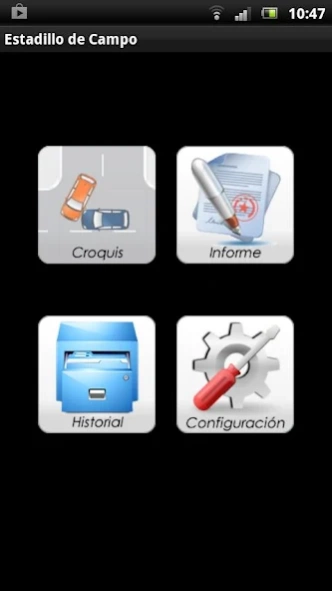


App for conducting field for the summary and report traffic accidents
Support for conducting field meter readings and report traffic accidents.
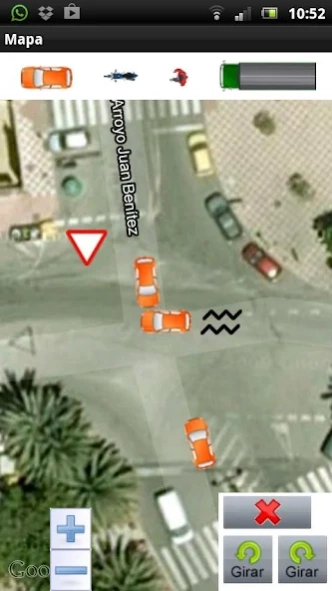
Basic tool to equip the police for faster preparing reports and reports as well as better accuracy in performing sketch using google maps.
Ship via email to the head of the city or the team packed with all the data collected and the technical report police.
A key tool for police involved in traffic accidents because of its simplicity and speed.
Options in the Sketch section:
- Insert vehicles: Car, truck, motorcycle and pedestrian. Which can move, rotate and delete
- Insert elements: traffic signals, brake marks, ponds, trees, etc..
- Insert numbers to mark the elements located in the sketch.
- Actual measurement, placing landmarks on the map.
- Screenshot to store the image of the sketch, to attach to the report.
Report:
From this section you can fill in all the necessary data in the report:
- Details of the vehicles involved.
- Data from the drivers, passengers, pedestrians and witnesses.
- Visual inspection, technical report and police.
History:
This section stores all the reports created, which is available at any time all your data and email.
The application is the brainchild of Carlos Rodriguez Coronil and was developed by Alex Gonzalez and Miguel Training Center Gauss, SL
About Estadillo de Campo
The company that develops Estadillo de Campo is GaussWebApp. The latest version released by its developer is 1.0.
To install Estadillo de Campo on your Android device, just click the green Continue To App button above to start the installation process. The app is listed on our website since 2012-11-21 and was downloaded 0 times. We have already checked if the download link is safe, however for your own protection we recommend that you scan the downloaded app with your antivirus. Your antivirus may detect the Estadillo de Campo as malware as malware if the download link to gauss.ejemplos.maps is broken.
How to install Estadillo de Campo on your Android device:
- Click on the Continue To App button on our website. This will redirect you to Google Play.
- Once the Estadillo de Campo is shown in the Google Play listing of your Android device, you can start its download and installation. Tap on the Install button located below the search bar and to the right of the app icon.
- A pop-up window with the permissions required by Estadillo de Campo will be shown. Click on Accept to continue the process.
- Estadillo de Campo will be downloaded onto your device, displaying a progress. Once the download completes, the installation will start and you'll get a notification after the installation is finished.
Program Details
System requirements
Download information
Pricing
Version History
version 1.0
posted on 2012-11-21
Disclaimer
Official Google Play Link
We do not host Estadillo de Campo on our servers. We did not scan it for viruses, adware, spyware or other type of malware. This app is hosted by Google and passed their terms and conditions to be listed there. We recommend caution when installing it.
The Google Play link for Estadillo de Campo is provided to you by apps112.com without any warranties, representations or guarantees of any kind, so access it at your own risk.
If you have questions regarding this particular app contact the publisher directly. For questions about the functionalities of apps112.com contact us.
